Picking a document AI model is hard. Every vendor claims 95%+ accuracy. General-purpose benchmarks test reasoning and code, not whether a model can extract a complex table from a scanned invoice.
So we built the Intelligent Document Processing (IDP) Leaderboard.
3 open benchmarks. 16+ models. 9,000+ real documents. The tasks that matter: OCR, table extraction, key information extraction, visual QA, and long document understanding.
The point isn’t to give you one number and declare a winner. It’s to let you dig into the specifics. See where each model is strong, where it breaks, and decide for yourself which one fits your documents.
The results surprised us. The #7 model scores higher than #1 on one benchmark. Sonnet beats Opus. Nanonets OCR2+ matches frontier models at less than half of the cost.
Why 3 benchmarks?
Every benchmark measures something different. Use one and you only see one dimension. So we used three.
OlmOCR Bench: Can you reliably parse a messy page? Dense LaTeX, degraded scans, tiny-font text, multi-column reading order. Models that excel at one often fail at another. This dataset includes diverse set of pdfs.
OmniDocBench: Does the model understand the document’s structure? Formulas, tables, reading order. Layout comprehension, not just character recognition.
IDP Core: Can you extract what a business actually needs? This one is ours. Invoices, handwritten text, ChartQA, DocVQA, 20+ page documents, six kinds of tables. The stuff that breaks production pipelines. These are more reasoning heavy tasks than the other two benchmarks.
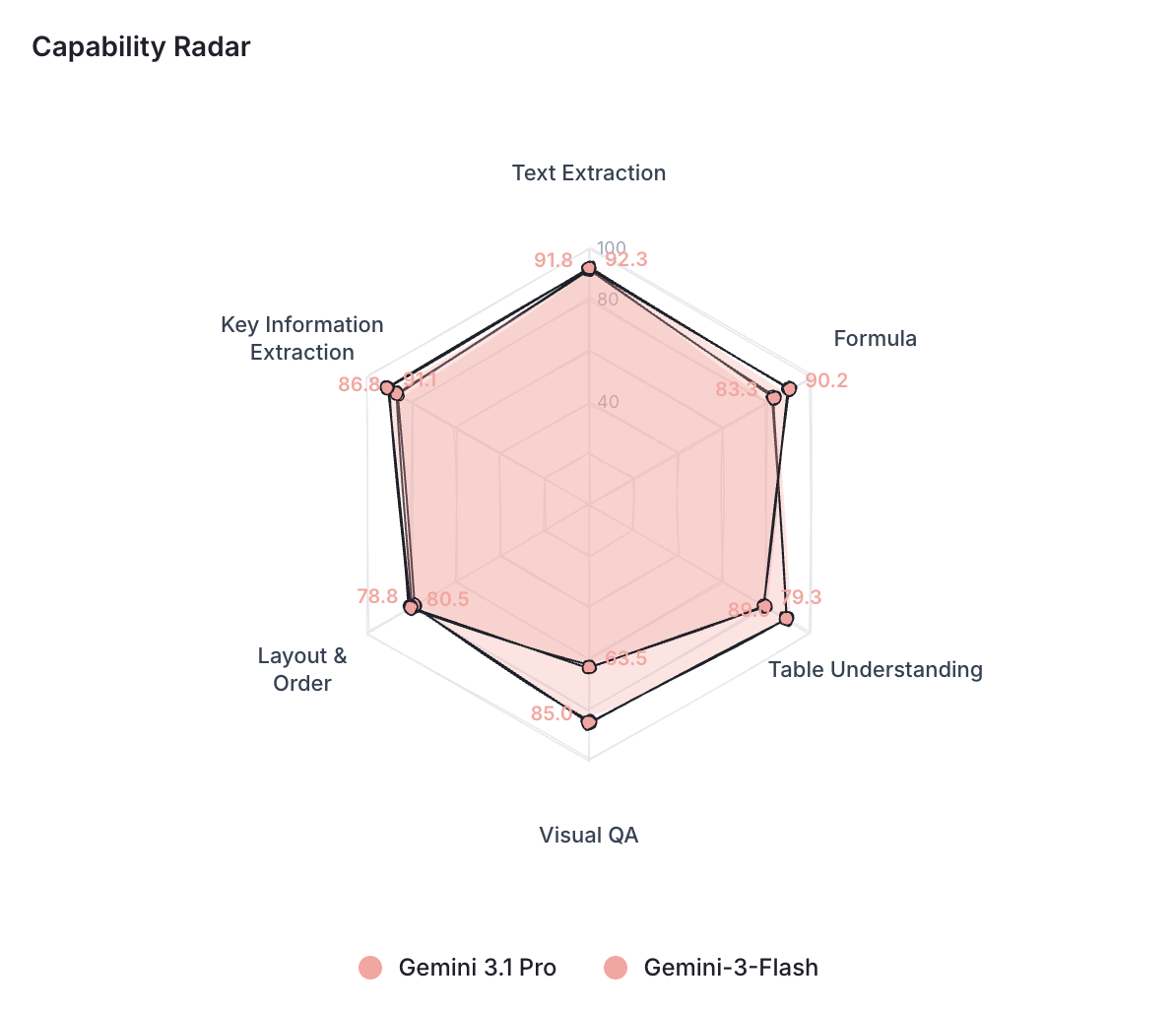
Each model gets a capability profile across six sub-tasks: text extraction, formula handling, table understanding, visual QA, layout ordering, and key information extraction.
Explore each model’s capability profile at: idp leaderboard
What the leaderboard actually lets you do?
Most leaderboards give you a table. You look at it. You pick the top model. You move on. It feels like being a by-stander and not hands-on.

We wanted something more transparent and hands-on than that.
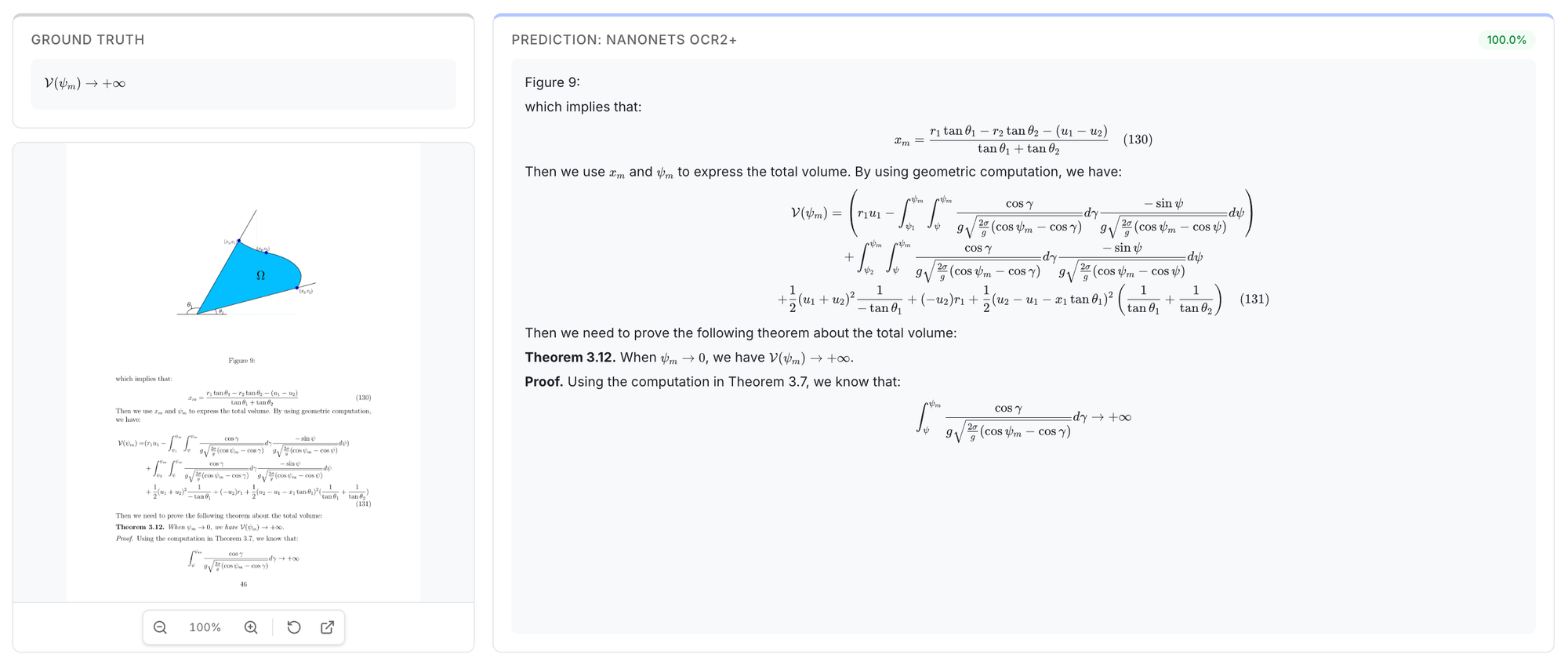
For that we created the Results Explorer that lets you see actual predictions and compare models on real documents. For any document in the benchmark, you see the ground truth next to every model’s raw output. This makes you see and compare the use-cases that’s relevant to you.
This is powerful as it also makes you question the ground truth and gives you the full picture of what’s going behind the scenes of each benchmark task.
You can see exactly where it hallucinated a table cell or missed a handwritten word. Here’s an example showing how models handle complex formula extraction.
1v1 Compare puts two models side by side across all six capability dimensions.
How did we run it?
We wanted anyone to be able to run all three benchmarks. So we made setup as close to zero as we could.
Everything pulls from HuggingFace. We pre-rendered all PDFs to PNGs and hosted them at shhdwi/olmocr-pre-rendered so you don’t need a conversion pipeline. IDP Core embeds images directly in the dataset. Nothing to clone yourself or unzip.
The runner works with any model that has an API. Failed runs pick up where they left off.
Here’s the Github repo link to try it yourself: IDP Benchmarking repo
Here’s what stood out.
Gemini 3.1 Pro dominates VQA tasks
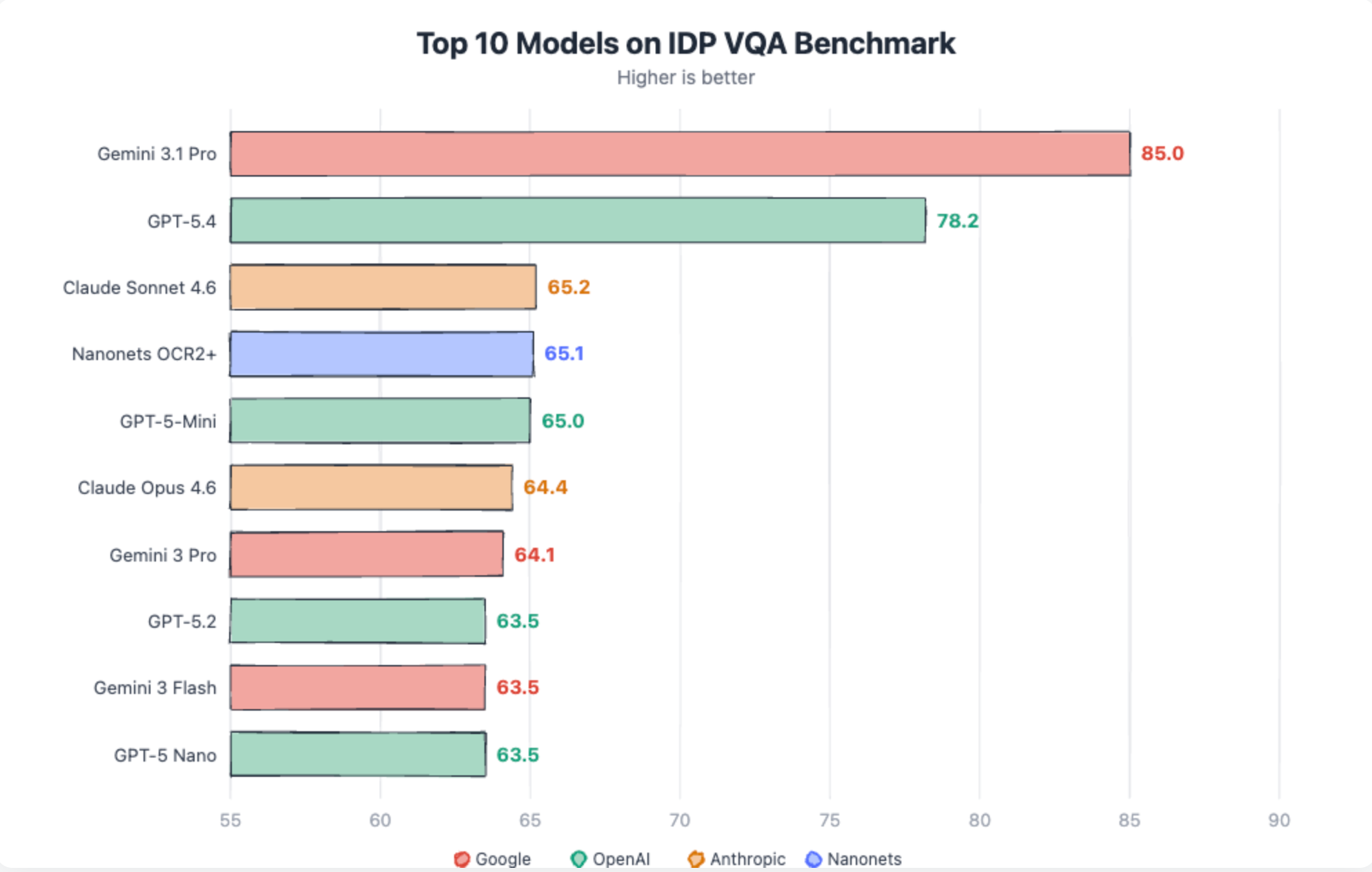
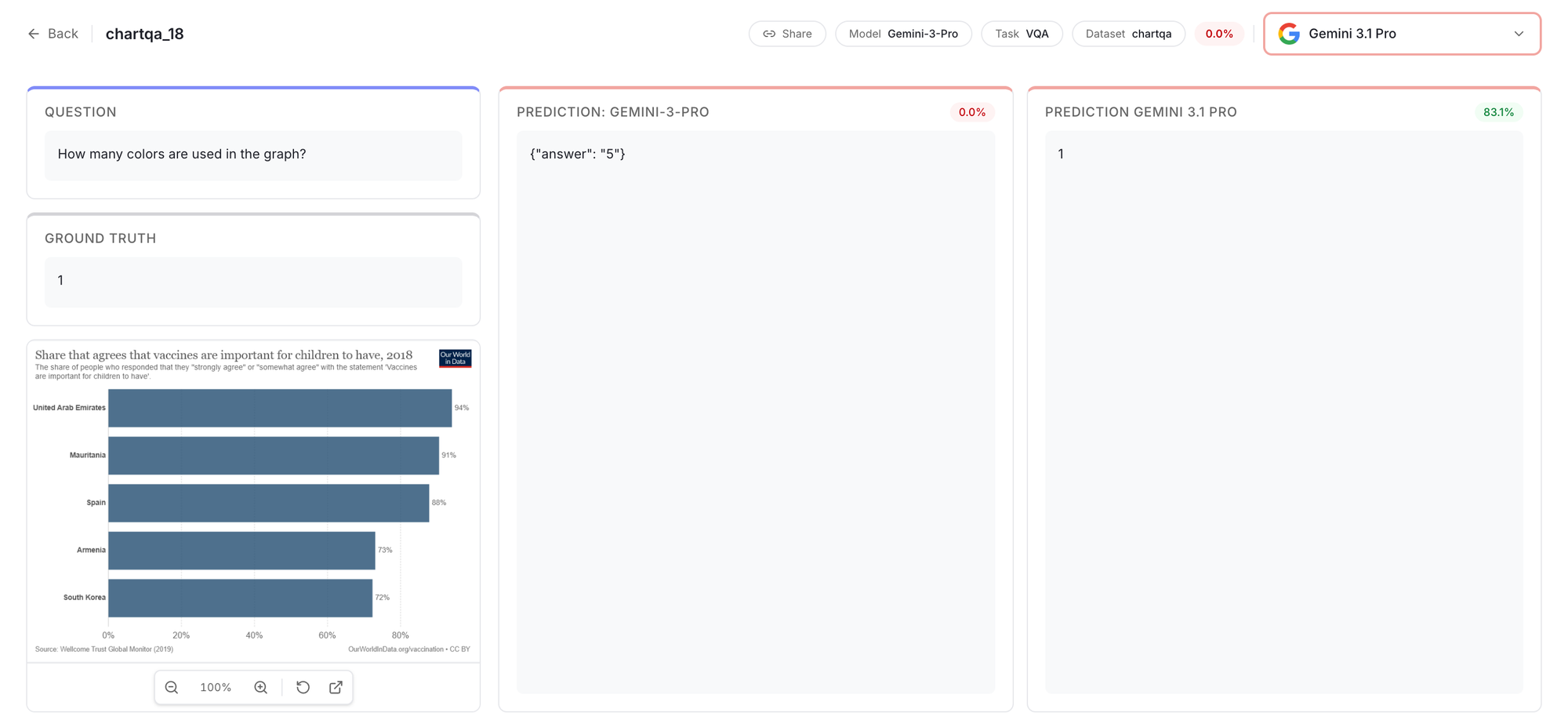
Gemini 3.1 scores 85 in VQA, well above any other model. Closest to it is GPT-5.4 at 78.2. Rest all models are in 60’s.
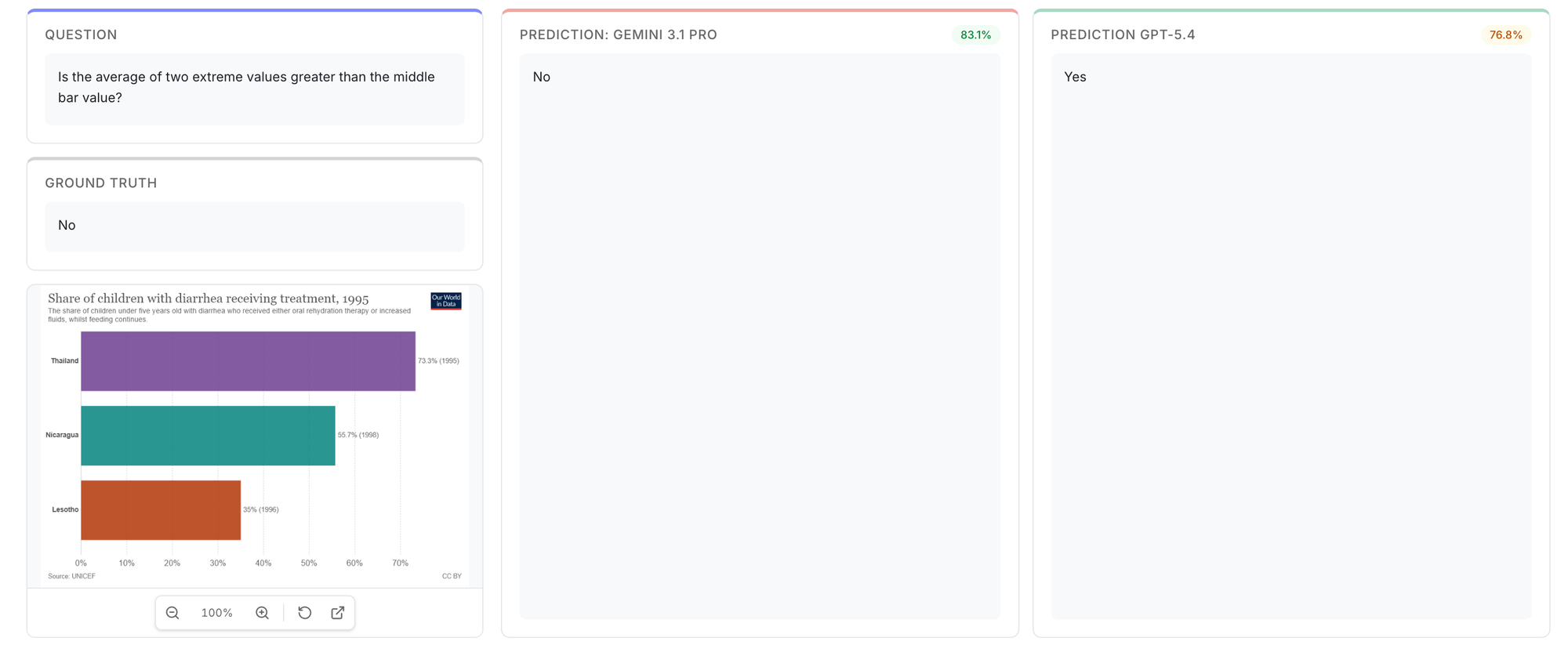
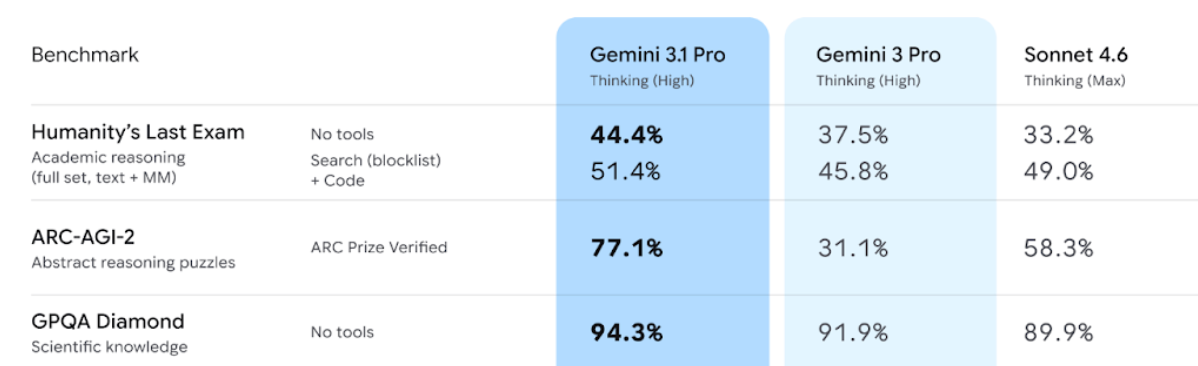
This is also seen in the latest benchmarks released by Google. Gemini 3.1 pro is better at reasoning tasks. Same holds true for Document VQA tasks as well.
Cheaper models are surprisingly good
This kept coming up.
- Sonnet 4.6 (80.8) is as good as Claude 4.6 (80.3)
- Gemini-3 flash matches Gemini-3 pro and sometimes even better (in Omnidoc bench)
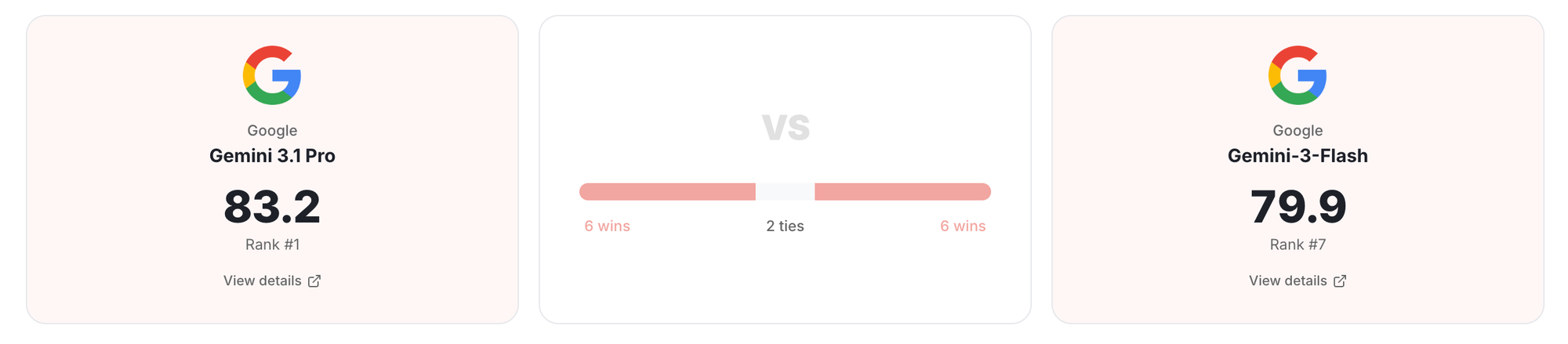
This could point to something interesting. Cheaper models match expensive ones on extraction. Text, tables, layout, formulas. They seem to be reading documents the same way under the hood. The gap only appears when you ask them to reason about what they read. That’s where bigger models pull ahead, and that’s where Gemini 3.1 Pro’s lead actually comes from.
Same is confirmed below by the capability radar between Gemini 3.1-pro and Gemini 3-flash:
Cost changes the math
Here’s the part that matters if you’re processing documents at any real volume.
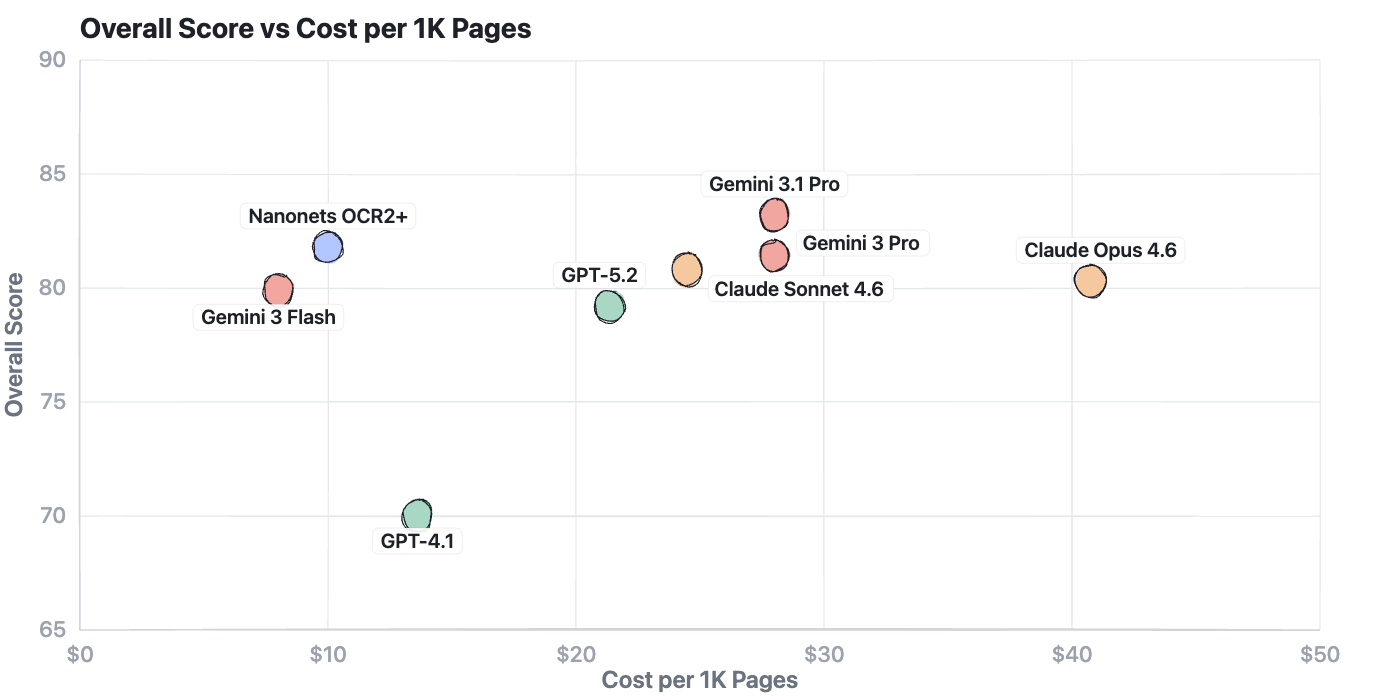
The Nanonets OCR2+ model is a great balance for both accuracy and cost when it comes to scale. Click here for the model’s full profile
Where things still break!
Sparse, unstructured tables remain the hardest extraction task.
Most models land below 55%. These are tables where cells are scattered, many are empty, and there are no gridlines to guide the model. Only Gemini 3.1 Pro and GPT-5.4 consistently handle them at 94% and 87% respectively, still well below their 96%+ on dense structured tables
Click Here to check the Gemini 3.1-pro outputs on long sparse docs

Handwriting OCR hasn’t crossed 76%. The best model is Gemini 3.1 Pro at 75.5%. Digital printed OCR is 98%+ for frontier models. Handwriting is a fundamentally different problem and no model has cracked it.
Chart question answering is unreliable. Nanonets OCR2+ leads at 87%, Claude Sonnet follows at 85%, GPT-5.4 drops to 77%.
The failures are specific: axis values misread by orders of magnitude, the wrong bar selected, off-by-one errors on closely spaced data points.

Handwritten form extraction hallucinates on blank fields. Every model clusters between 80-84% on this task. The failure mode is consistent: models fill in values for fields that are blank on the form. A name, a date, a status that doesn’t exist in the document.
Gemini > Claude = OpenAI
The pecking order was settled. Gemini led, Claude followed, OpenAI trailed. GPT-4.1 scored 70.0. Nobody was picking OpenAI for document work.
For GPT-5.4 Table extraction went from 73.1 to 94.8. DocVQA went from 42.1% to 91.1%. GPT-5.4 got better at understanding documents and reasoning.
The overall scores are now 83.2, 81.0, 80.8. Close enough that the ranking matters less than the shape. Claude leads on formulas. GPT-5.4 leads on tables and QA. Gemini leads on OCR and VQA.

One thing worth noting: Claude models had stricter content moderation that affected certain documents. Old newspaper scans, textbook pages, and historical documents sometimes triggered filters. This hurt Claude’s scores (only in OmniDoc and OlmOCR).
Now, Which Model Should you pick?
Every vendor will tell you their model is 95%+ accurate. On structured tables and printed text, they might be right. On sparse tables, handwritten forms, and 20-page contracts, most models struggle.
Running a high-volume OCR pipeline? Nanonets OCR2+ gives you top-tier accuracy at $10 per thousand pages.
Processing complex tables or need high accuracy on reasoning over documents? Gemini 3.1 Pro is worth the premium at $28/1K pages.
Building a simple extraction workflow on a budget? Sonnet and Flash match their expensive siblings on extraction tasks. Nanonets OCR2+ fits here too, strong accuracy without the frontier price tag.
But don’t take our word for it. The leaderboard has the scores. The Results Explorer has the actual predictions. Pick a task that matches your workload. Look at what they output on real documents. Then decide.
What’s next
We will be adding more open-source models and document processing pipeline libraries to the leaderboard soon. If you want a specific model evaluated, request it on GitHub.
We’ll keep refreshing datasets too. Benchmarks that never change become targets for overfitting.
The leaderboard is at idp-leaderboard.org. The Results are open. The code is open. Go look at what these models actually do with your kinds of documents. The numbers tell one story. The Results Explorer tells a more honest one.